
AI Analyst Chat
AI Analyst Chat is an agent that does company research for you. You ask a question, and rather than answering from what a language model already knows, it plans its own steps to reach the answer, gathers the evidence itself, checks what came back, and keeps going until the question is resolved. It is an expert on the company you are analyzing, it cites every figure to the passage it came from, and it never makes a number up.
How the Agent Works
The agent works in a loop: gather the evidence, check what came back, and decide whether the question is resolved or another pass is needed. It chooses which sources to reach for and in what order based on what you asked. The steps surface in the thread as it works, so you can see what it looked at, what each step returned, and how it got to the answer.
It is built to be thorough before it is fast, and errs toward checking one more source rather than fewer. It does not accept a single empty result as the answer: when one approach turns up nothing, it tries another before it tells you a figure is unavailable. Before it finishes, it reviews what it gathered for completeness, so a half-answered question does not reach you.
That same standard governs how it talks to you. It corrects a wrong premise rather than going along with it, says so plainly when something genuinely cannot be found, and never fabricates a figure to fill a gap. Accuracy is held above agreeing with you.
The agent runs as of a date. It knows the date the analysis is being run for and resolves "current quarter" or "last year" against that date, so a question asked about a past period does not leak in figures that were not known yet. You can also pin specific evidence: attach a document or an earlier note to your message, and the agent reads each attachment before it answers rather than searching for something it was already handed.
Sources It Reaches For
The agent has a wide set of sources and chooses among them per question. They cover the company's numbers, its documents, the research already run on it, and the context around it. What the agent can read for a given company is set by Company and Data Coverage.
Financials. It reads structured financial reports across reporting periods: income statement, balance sheet, cash flow, and segment data. A financial question rarely maps straight to a single reported figure, so the agent first works out what you are asking for. It interprets the metric and the periods, resolving "last quarter" against the date it is running as of, treating a full year as its 4Q representation, and summing the constituent quarters when a trailing-twelve-month figure is needed. If the structured reports cannot answer, it searches the financial documents rather than giving up. The figures it returns are read as reported. Consensus estimates and expectations come from this financial data, never from the open web.
Primary documents. It has the full document record for the company: annual and interim reports, earnings call transcripts including prepared remarks and Q&A, press releases, and the regulatory filings around an event. It can list what exists for a period, read a specific document, and search across all of them for a fact. Searches span the whole document, not only the summary, so a number buried in the Q&A is reachable. It works from the current version of a fact rather than one a later disclosure has superseded, and a long filing is read in full rather than truncated.
Deep Research Agents. It runs Deep Research Agents and works from their results. It can launch an agent on the company, list the results already saved for it, read any of them, and fold their findings into its answer. A completed result, such as a guidance ledger or a tariff-impact analysis, becomes material the agent reasons over rather than a separate report you read on its own.
Beyond the company. When a question calls for it, the agent lists related companies by relationship, competitor, supplier, or customer, and it can run a web search for news and context that is not in the filings. Web search is held to general context. It is barred from using the web for estimates, ratings, or price targets, because those vary by source and would undercut the numbers.
Single Company Expert
The agent is deliberately scoped to a single company. The main conversation holds that company's full context: filings, earnings calls, press releases, and management commentary. A typical analyst covers 40 to 60 companies, and one agent stretched across all of them at once would hold none of them in the depth this work needs. Scoping to one company is what gives the agent its depth.
When your question reaches another company, the agent does not answer from general knowledge. It opens a separate expert on that company behind the scenes, asks it the question, and brings the answer back into your thread. You see which company was queried and what it found, as a visible step. Name a ticker and it queries that company. Ask about "competitors" without naming them and it uses the relationship map to decide which names to query, and it queries several in parallel for a comparison.
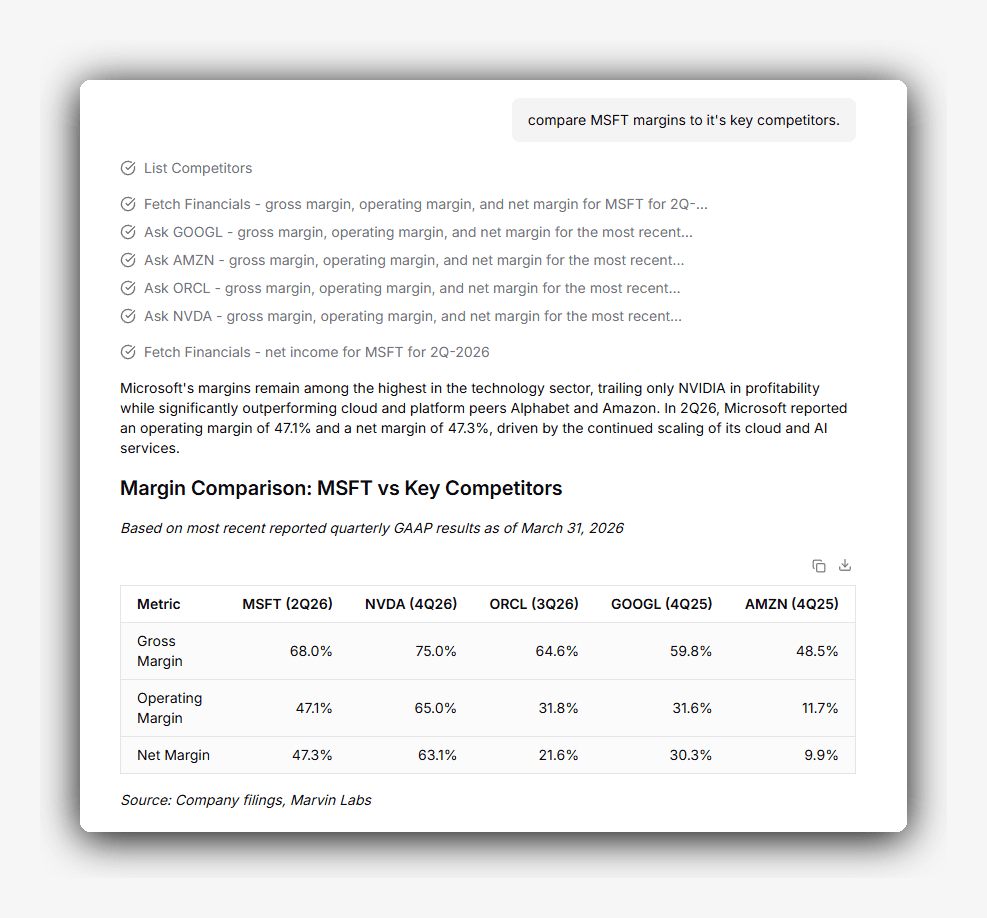 Asking about competitors fans out to a separate expert per peer, each step visible, with the results returned as one comparison table.
The expert it consults is a full agent in its own right, working the same way over its own company, but held to a tight brief. It gets only the financials and the primary documents for that company. It cannot run a web search, cannot consult a third company, and cannot touch your notes. It answers the one question, grounded in primary documents with citations, and returns. That constraint is what keeps a cross-company answer as trustworthy as a direct one. Every figure still traces to a filing, and the consulted expert cannot wander off its own company's record into a chain of secondhand lookups.
Output Artifacts
Alongside its written answers, the agent produces artifacts you can keep and take with you: research notes, tables, and charts.
Research Notes
A Deep Research Agent result opens as an editable note next to the conversation, the chat on the left and the note on the right. As you direct the work, the agent writes to the note instead of leaving the result buried in the thread. Ask it to pull capital allocation into its own section weighted by what management said this quarter, or to add a column to a peer table, and the note changes while the conversation stays a conversation. You can also turn the current thread into a note with the /to-notes slash command, which synthesizes the discussion into a saved report.
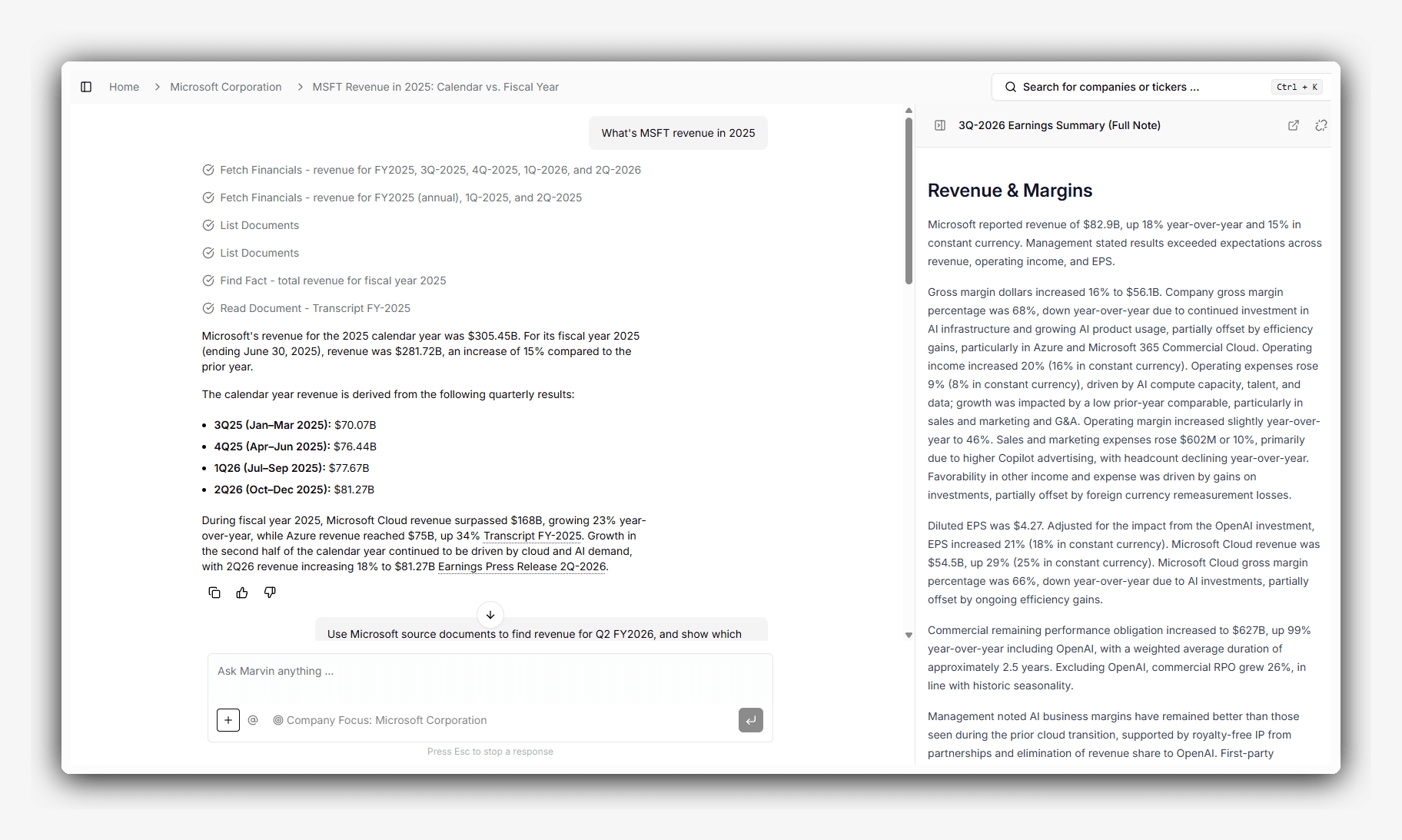 The chat on the left, the editable note on the right. Directing the chat updates the note without cluttering the thread.
Notes are versioned. Every change keeps the prior versions, so the note's history stays intact. Editing a note that someone else owns makes a private copy for you first and leaves the shared original untouched. Because the note stays grounded in the same filings, calls, and press releases with its citations preserved, the work compounds across earnings cycles instead of being rebuilt each period. A note exports to PDF or Markdown, and you can copy its Markdown or share a link to it.
Tables
The agent renders two kinds of table. A plain table organizes text and values into rows. A financial table is richer: each column carries its own type and formatting, money, percent, multiple, or basis points, with a currency, a magnitude such as millions or billions, and a precision. Subtotal and total rows are set off in bold, columns can be grouped under a banner such as "Actuals," and the table carries a title, a source note, and footnotes. A financial table exports to Excel, CSV, or Markdown, and the Excel export preserves the number formats so the cells stay numeric.
Charts
The agent picks the chart that fits the question: a bar chart for a peer comparison, a line chart for a trend, and stacked bars, waterfalls, or pies where they suit the data.
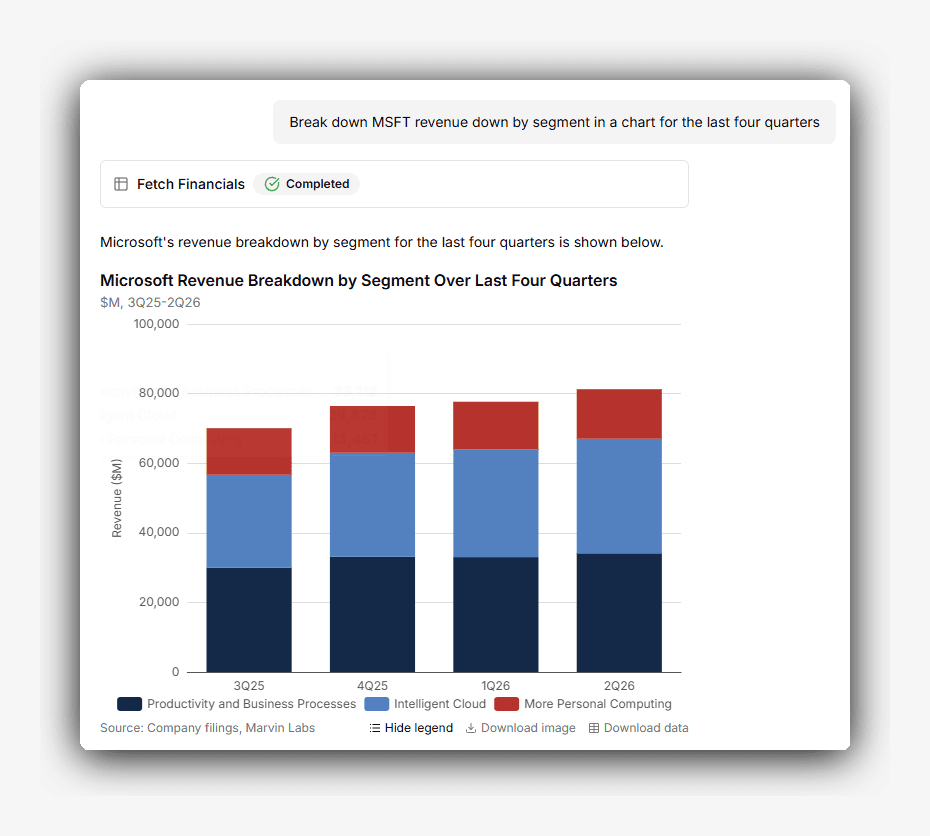 A chart rendered inline from a question, with controls to download the image or the underlying data. Charts render inline alongside the written analysis, with a headline that states the insight, axis labels, and a source attribution. You can hover for exact values, and where a series crosses from actuals into estimates the chart marks the boundary. If a number looks off, ask a follow-up and the chart updates. A chart exports as a PNG image, and its underlying data exports to CSV.
The agent handles comparisons and summaries well. Full financial models, custom valuation frameworks, and firm-specific reporting templates still belong in dedicated modeling tools.
Usage is billed in Marvin AI Credits, where one credit typically covers a question-answer pair and Deep Research Agent results folded into a thread are billed separately.